Help
Everything the aspiring duelist needs to know.
The Basics
Getting Started
To get started you'll want to do the following:
- Go to the Armory. Buy some weapons and armor - we've given you
10 gold to get started! Remember that the total Power Rating of the weapons and armor you
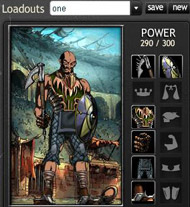
can wear at one time is constrained by your avatar's Power. You can see your Current Power
[Max Power] in the left pane next to your avatar's headshot.
- Also buy some Packs with tokens. You get tokens through Challenges and Skirmishes. Open the
Packs - you'll get scrolls (important for later) and items.
- Click the Loadout link in the left pane to put the armor and weapons you've bought onto your
avatar. Make sure you save your loadout if you make any changes.
There are two types of duels:
- Challenges: These are real duels that count on your record, give you more experience
points, and better rewards. Don't worry too much about your record early on though, you will
have the opportunity to wipe it clean.
- Skirmishes: These don't show up on your record. They are good for training and
learning, but grant fewer experience points.
You can browse other users and challenge them by clicking the
Arena link.
Character Attributes
What attributes do for your Avatar:
Strength: Increases your ability to do melee damage and your health.
Speed: Increases your chance to hit and your precision. It is also the primary determinant of who attacks first.
Intelligence: Increases your magical abilities.
Perception: Measures your character's awareness of their surroundings. Increases your chance to critical stirke and your Precision.
Stamina: Increases your health.
Resist: Increases your chance to resist scrolls and spells.
Precision: Increases your dodge, chance to hit, and chance to get a critical strike. You cannot directly increase your Precision, it is impacted by your Speed, Perception, and Level.
TIP: Until you decide how you want to develop your character, Stamina is a safe bet.
Know Your Power
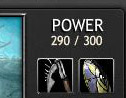
As you progress in levels, you will gain more Power. Power is very important because it determines
what weapons you can use and what armor you can wear. Every item has a Power Rating.
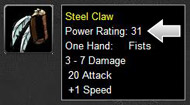
The total Power of all the items you have equipped cannot exceed your Power.
In the loadout manager, you will see your Current Power and Max Power above your equipment slots. As
you add or remove equipment the Current Power number will adjust automatically. Under normal
conditions (no special skill benefits applied) you can not use an item if that item's Power exceeds
your Avatar's Power limit. If you have only 10 Power available, a sword that has an 11 Power Rating
cannot be equipped - it will put you over your Power limit.
You can also see your Current Power [Max Power] in the left pane next to your avatar's headshot.
Go on a Quest!
Taking on a quest is a good way to earn special items and gain valuable experience. Who knows what
wonderful surprises and knowledge you'll find!
You can always find your available quests by clicking the
Quests
link in the left pane.
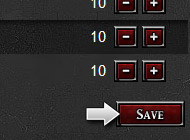
Save Your Attribute Points
After distributing attribute points to your Avatar, don't forget to save it.
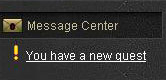
Check Your Messages
Remember to check your Message Center for:
- New challenges
- Challenge results
- New quests
- Messages from other players
- And more!
You can also subscribe to your Message Center by clicking the small RSS button.
Buying Packs
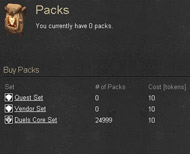
Packs are an important part of Duels - they are how you acquire treasure. Packs typically include an
item, one or more scrolls, and some gold. There are various types of Packs. You can see what is
currently available by clicking the
Packs link.
Packs can be acquired:
- By purchasing them with tokens. You earn tokens through duels, skirmishes, quests, and
badges.
- By using Noblestones.
Noblestones can by purchased here.
Using Scrolls
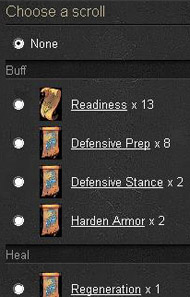
Try to keep a full inventory of Scrolls. Stack them up! Since Scrolls are one shot weapons, once you
use a Scroll it's gone from your inventory.
Diminishing Returns
You can only gain a certain amount of experience points and rewards (such as tokens) from dueling
the same duelist over and over again in a twenty four hour period. After three duels (challenges)
with the same duelist you will no longer receiver any experience points or rewards. The same is true
of skirmishes.
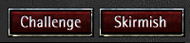
This is called diminishing returns. Your diminishing returns status with another duelist is
displayed on the challenge and skirmish buttons.
Equipment
Level 1 Equipment
Congratulations! You have taken
your first step on the road to fame and fortune. Good luck!
Did you know:
- You can buy basic weapons and armor in the Armory.
- To use a weapon or armor click Loadout.
- Don't buy weapons that exceed your Power.
At Level 1 you have access to the following weapon and armor slots:

|
Main-hand (weapons)
|

|
Chest (vests, doublets, shirts, breastplates, robes, etc)
|

|
Hands (gauntlets, gloves, wraps, etc)
|

|
Legs (leggings, pants, trousers, breeches, etc)
|

|
Feet (boots, sandals, etc)
|
Item Tiers (Weapons and Armor)
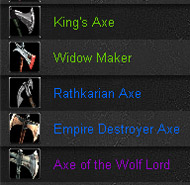
Armor and weapons are assigned Tiers according to their rarity and power. You can tell an item's
Tier by the color of its name.
1. Vendor -
Gray
2. Common -
Beige
3. Uncommon -
Green
4. Rare -
Blue
5. Epic -
Purple
6. Legendary -
Orange
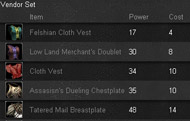
Tier 1 items can be purchased from vendors (in the Armory).
Common, uncommon, rare, epic and legendary items are more difficult to find. They can be found in
Packs, received as quests rewards, won in tournaments, and more. They can also be bought from other
players in the market.
Gaining Access to Different Armor Types

At certain levels you gain access to different armor types. If a slot on your Avatar's Loadout is
grayed out, you haven't reached the required level for that particular type.
Items will also display their
Required Level at the bottom of their stats.
Different Loadouts for Different Duels
Create Loadouts for different strategies: armor heavy, weapon heavy, balanced-a successful Loadout
can mean the difference between winning and losing.
Loadout Manager
Opening Your Loadouts
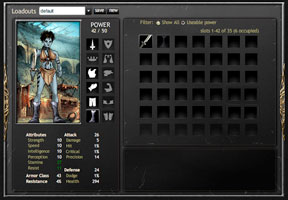
By clicking 'Loadouts' under your Avatar's picture in the left panel, you will be brought to an area
where you can customize your character with your choice of weapons and armor.
Adding Items
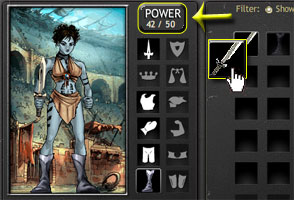
To add items to your default loadout, drag and drop your items on to your Avatar. Pay attention to
your power level! If your items' combined power exceeds your Avatar's possible power, you will be
unable to save and use that loadout. As you advance in Levels, your possible power will increase,
allowing further customization and upgrades.
Creating New Loadouts

To create a new loadout, hit the 'New' button and begin designing your avatar's weapons and armor
choice from scratch. Having mulitple loadouts with different item configurations will become useful
later on when you begin to choose your armor based on your next opponent's stats.
Saving the Loadout

To save your changes, hit 'Save'. If there were no problems, a message will come up letting you know
your loadout was saved. You're ready to continue playing!
Buying and Selling
Sell Items to Vendors
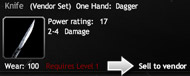
Need gold fast? Sell your unwanted items to the vendor. Click on an item in your inventory and
select Sell to Vendor at the bottom of your page. Click on View Details Page to see the current
selling price.
You can also sell items in bulk from you
Avatar
Profile Page under the Equipment tab.
Selling Items in the Marketplace
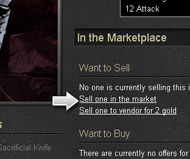
Want to sell your unwanted items for the best price possible? Click on an item in your inventory and
select View Details Page. Select
Sell one in the market and set your price. Remember the item
will remain for sale until you cancel it.
You can also sell items in bulk from you
Avatar
Profile Page under the Equipment tab.
Buying Items from Vendors
Want to buy an item from the Vendor? Go to the Armory and select your category. Find the item you
wish to buy and click on Purchase.
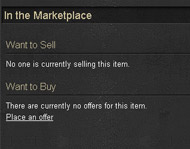
Buying Items in the Marketplace
Want to buy an item that is not available from a vendor? Go to the Armory and select the category of
the item you are looking for. Find the item. Click on the item and bring up its Item Detail
Page.
- If there is one available at a price that you are willing to pay, click Buy.
- If there isn't one available you can place an offer to buy one. Click Place an Offer
and input the price you are willing to pay. Remember that your offer will remain in place
until you cancel it.
Dueling
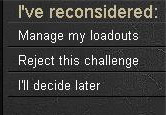
You don't always have to fight...
When challenged to a duel, you can choose to reconsider your acceptance.
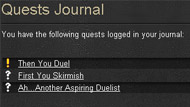
Use your quest journal
Remember to check your Quests Journal for current, pending, and completed quests, by clicking the
Quests link in the left pane.
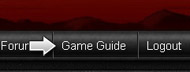
Get more detailed information
Want more detailed information about the world of Duels? Click on Game Guide at the top of your
browser.
Advanced Dueling Tips
Use scrolls to offset your weaknesses
Know your weaknesses and strengths. Use Scrolls to bolster your offensive or defensive abilities in
a duel. Scrolls can turn the tide of any fight.
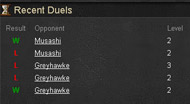
Study your opponent's recent duels
Studying the details of an opponent's most recent duels can be vital in preparing your own
strategies.
 Tournament Help
 Ladder Help
 Challenge Games
 Duels
Duels Duels Defense
 Duels Warstorm
 Baseball Boss
 Store
Store Sign In
 Register